Tiny Wiki for CircuitPython
Host a small Markdown-backed wiki from a Fruit Jam and microSD card for use on a trusted local network.
View original project ↗What you’re building
Tiny Wiki turns Adafruit Fruit Jam product 6200 into a small Wi-Fi web server whose wiki pages are Markdown files stored on the board’s microSD card. Tim C’s CircuitPython port is inspired by and reuses parts of Kevin McAleer’s MicroPython tiny_wiki. The application serves browser pages for listing, viewing, creating, editing and deleting content using Adafruit HTTPServer and TemplateEngine plus a minimal Markdown renderer. Install CircuitPython 10.x or newer, add Wi-Fi credentials to settings.toml and copy the guide’s project bundle to CIRCUITPY; the serial console then reports the local address and port. A microSD card and a browser with network access to the board are required. Authentication for write operations is optional and disabled by default, while pages remain readable without login even when it is enabled. Keep this project on a trusted local network: its server uses plain HTTP, default authentication secrets must be replaced, and it should not be exposed directly to the public internet.
Key steps
- Back up any files you need from CIRCUITPY, install the latest CircuitPython 10.x-or-newer Fruit Jam UF2 and verify that the CIRCUITPY drive appears.
- Create settings.toml in the root of CIRCUITPY with the exact Wi-Fi variable names used by the project, keeping credentials out of shared code and screenshots.
- Download the guide’s project bundle, copy its required libraries into CIRCUITPY/lib, and copy code.py, Home.md, tiny_wiki and templates to CIRCUITPY.
- Insert a microSD card, open the CircuitPython serial console, let the program connect to Wi-Fi and note the local server address and port it reports.
- Open the address from a browser with network access to the Fruit Jam and verify listing, viewing, creating, editing and deleting a non-sensitive test page.
- If enabling authentication, first set non-default WIKI_PASSWORD_SALT and WIKI_AUTH_SECRET_KEY values in settings.toml and restart. Open Credential Hash, generate the username/hash object, save it in the authentication JSON file, set WIKI_AUTH_DATA_FILE, restart again and confirm that write actions require login while remembering that all traffic and readable pages still use plain HTTP.
Original project and code
Original project pages, manufacturer documentation and repositories used while preparing this page. Last reviewed .
Hardware for this project
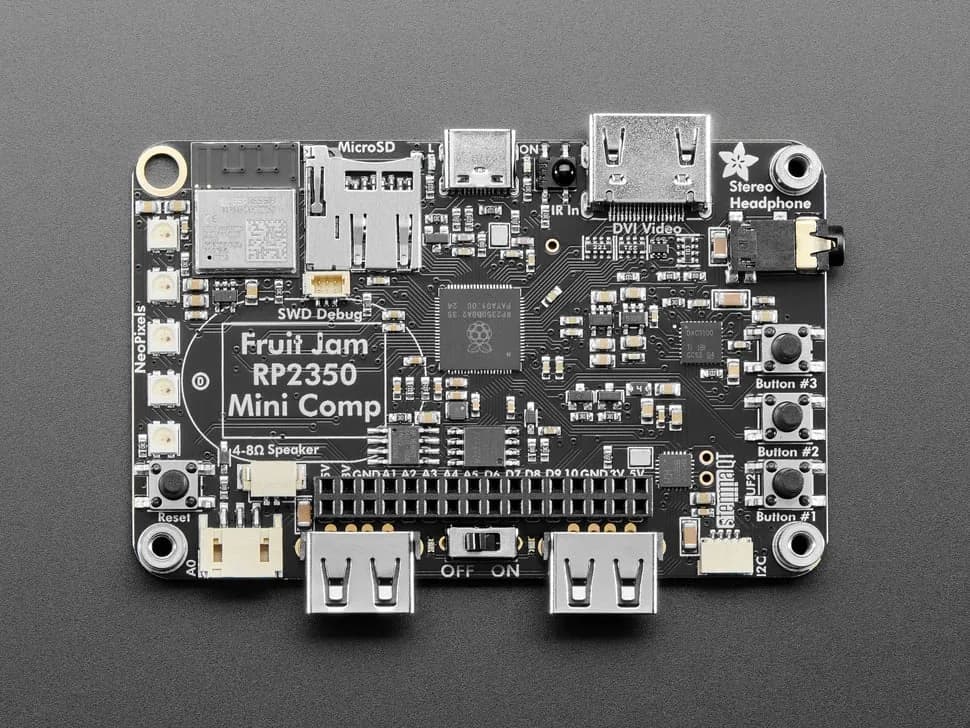
Fruit Jam
Credit-card-sized RP2350B computer board with DVI output, USB host, microSD, audio, Wi-Fi coprocessor and GPIO expansion.
- Platform
- Raspberry Pi RP2350B with ESP32-C6 connectivity coprocessor, CircuitPython/Arduino/Pico SDK · Circuitpython
- Builds
- 09