CircuitPython sampling keyboard
Record a sound through an I2S microphone, then play it at different pitches from a USB MIDI keyboard.
View original project ↗What you’re building
This Fruit Jam sampler records sound through an ICS-43434 I2S microphone, saves it as /sd/sample0.wav on a microSD card and maps it across a connected USB MIDI keyboard with granular pitch shifting. The CircuitPython program provides four-voice playback through the Fruit Jam’s 3.5 mm audio output and can also play a bundled MIDI file with the recorded sample. The saved sample reloads after power is removed; recording a new sample overwrites the previous sample0.wav. The exact project currently requires the development release CircuitPython 10.3.0-alpha.4 or newer because audioi2sin, audiofilewriter and GranularPitchShift were new modules when Adafruit published the guide. It was tested with an Akai MPK Mini 4, while the guide says a standard USB MIDI keyboard should work; other keyboards can require changing the control-change values used for record and song playback.
Key steps
- Back up any files you need from CIRCUITPY, install the Fruit Jam build of CircuitPython 10.3.0-alpha.4 or newer, and confirm that the CIRCUITPY drive appears.
- With power disconnected, wire Fruit Jam 3V, GND, D6, D7 and D9 to the ICS-43434 microphone breakout’s 3V, GND, BCLK, LRCL and DOUT pins respectively.
- Insert a FAT-formatted microSD card, connect the USB MIDI keyboard to the left USB host port, and connect powered speakers to the right USB port and 3.5 mm audio output as shown in the guide.
- Download the guide’s project bundle, copy its library files into CIRCUITPY/lib, and copy code.py plus anna-magdalena-20a.mid to the CIRCUITPY root.
- Press the MIDI control assigned to record, then hold a key while making a sound; release the key to stop recording and save /sd/sample0.wav.
- Play several keys to verify pitched four-voice output. If the record or song buttons do not respond, read their ControlChange values in the serial console and update CC_RECORD and CC_PLAY_SONG in code.py.
Original project and code
Hardware for this project
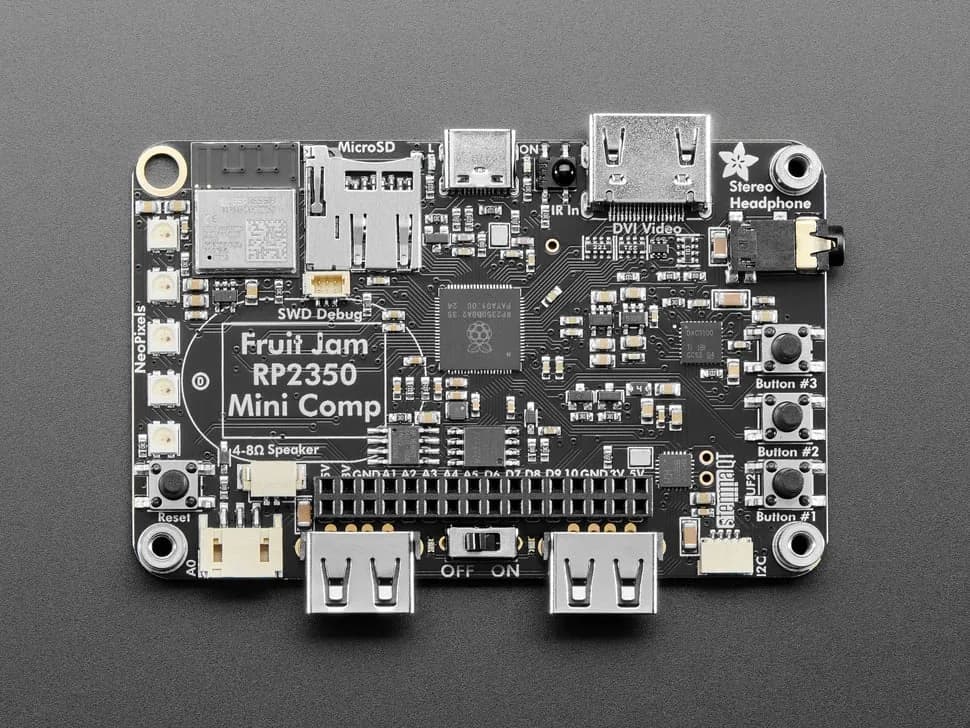
Fruit Jam
Credit-card-sized RP2350B computer board with DVI output, USB host, microSD, audio, Wi-Fi coprocessor and GPIO expansion.
- Platform
- Raspberry Pi RP2350B with ESP32-C6 connectivity coprocessor, CircuitPython/Arduino/Pico SDK · Circuitpython
- Builds
- 13