ColecoJam ColecoVision emulator
Flash ColecoJam 1.1 to run lawfully dumped ColecoVision BIOS and cartridge images on an Adafruit Fruit Jam.
View original project ↗What you’re building
Dan Cogliano’s ColecoJam turns the exact Adafruit Fruit Jam product 6200 into a ColecoVision emulator with 640×480 video, HDMI audio and one or two SNES-layout USB controllers. Release 1.1 provides a ready-built colecojam.uf2 and fixes sprite ordering that previously hid objects in some games. The emulator reads an 8 KB BIOS named COLECO.BIN and case-insensitive .ROM files from a coleco directory on a FAT32 microSD card; neither copyrighted BIOS nor game files are included. Its browser maps the original controller’s side buttons and numeric keypad to shoulder, face, Select and Start combinations. Support remains narrower than a desktop emulator: the project does not support bank-switched Megacart images larger than 32 KB, and unusual USB gamepads may need code changes. Flashing the UF2 replaces the current board firmware. Back up anything needed, use only BIOS and cartridge dumps you are entitled to use, and start with a small known-good image.
Key steps
- Back up any Fruit Jam firmware or files you need, open release 1.1, and download its colecojam.uf2 asset; do not follow the repository’s stale section that says no prebuilt UF2 is available.
- Format a microSD card as FAT32, create a coleco directory at its root, add a lawfully obtained 8 KB BIOS as /coleco/COLECO.BIN, and add only lawful cartridge images with a .ROM extension.
- Connect the Fruit Jam with a USB data cable, hold Button 1, press and release Reset, and continue holding Button 1 until the RP2350 mass-storage drive appears.
- Copy colecojam.uf2 to RP2350, wait for the automatic reboot, and do not disconnect power while the firmware copy is in progress.
- Power the board off, insert the prepared microSD card, connect a 640×480-capable display by HDMI and attach one or two supported SNES-layout USB controllers, then power it on.
- Select a small known-good cartridge image in the browser and verify video, HDMI audio and controls. Keep images at 32 KB or smaller, and consult the documented keypad combinations when a game requests a number, star or hash key.
Original project and code
Hardware for this project
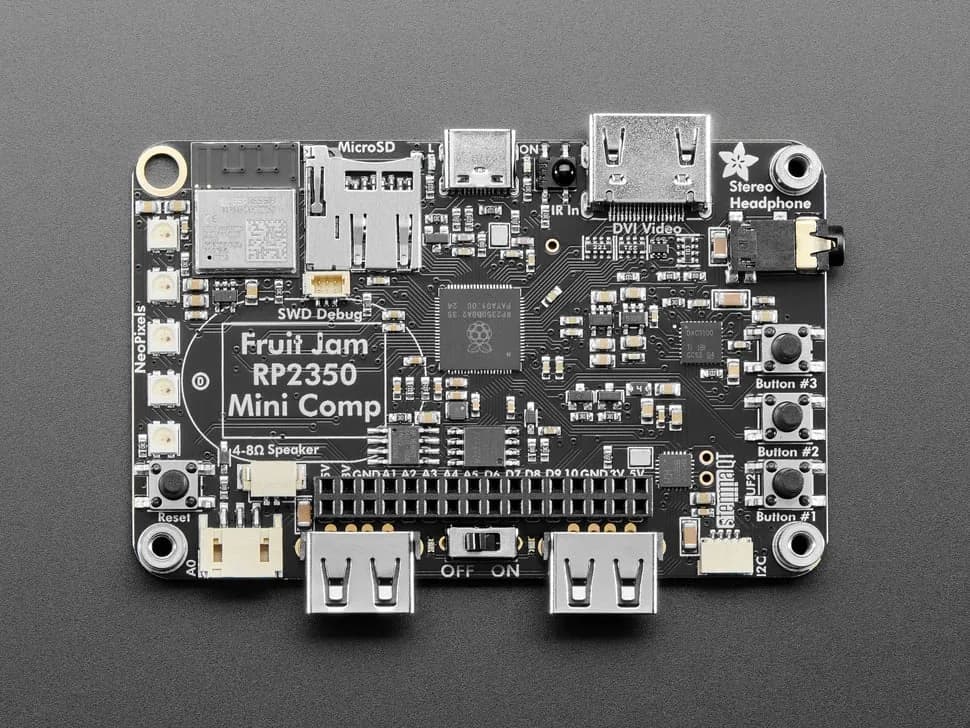
Fruit Jam
Credit-card-sized RP2350B computer board with DVI output, USB host, microSD, audio, Wi-Fi coprocessor and GPIO expansion.
- Platform
- Raspberry Pi RP2350B with ESP32-C6 connectivity coprocessor, CircuitPython/Arduino/Pico SDK · Circuitpython
- Builds
- 13