Space Invaders single-game arcade firmware
Flash Adafruit’s Fruit Jam-specific UF2 to run a single-game Space Invaders cabinet with DVI video, sampled audio and wired arcade controls.
View original project ↗What you’re building
Adafruit Arcade Machines v2.16.3 includes a Fruit Jam-specific Space Invaders UF2 built with its Single Arcade Machine Port architecture. The firmware models the original Intel 8080 machine, reads a lawfully obtained four-chip ROM set and WAV samples from microSD, sends video and audio over DVI, and can also use the board’s headphone or speaker output. Directly wired controls cover coin, one- or two-player start, movement and fire. The three onboard Fruit Jam buttons adjust aspect ratio, rotate the picture for portrait play and mirror it for a Pepper’s Ghost cabinet. Those display choices are saved in a plain-text settings file on the card and restored at the next boot. The release does not include copyrighted ROM or sample data. The SD card must use FAT32 with an MBR partition scheme. Individual missing samples are tolerated, but the current firmware needs at least one valid sample and a usable ROM set to start the game.
Key steps
- Back up any Fruit Jam firmware and microSD files you need, download invaders_fruitjam.uf2 from release v2.16.3, and confirm that the filename targets Fruit Jam rather than Feather ESP32.
- Format the microSD card as FAT32 with an MBR partition scheme, create /rom and /samples, then place lawfully obtained invaders.h, invaders.g, invaders.f and invaders.e files in /rom and lawfully obtained 0.wav through 9.wav files in /samples; the game needs at least one valid sample to start.
- Following Adafruit’s shooter wiring page, connect normally open switches between ground and GPIO45 for coin, GPIO6 for one-player start, GPIO7 for two-player start, GPIO8 for left, GPIO9 for right and GPIO10 for fire; check every connection with power off before attaching the board.
- Connect the Fruit Jam with a USB data cable, switch it on, hold BOOT/BUTTON1, press and release Reset, release BOOT when the RP2350 drive appears, and copy invaders_fruitjam.uf2 to that drive.
- Power off, insert the prepared card, connect the DVI display and audio output, then power on. A red screen means the card did not mount; yellow means no usable ROM loaded or every sample failed.
- Insert a test credit and verify start, movement, fire, video and audio. Use the onboard buttons to choose aspect, rotation and optional mirror mode, then reboot once to confirm that /invaders.fruitjam.cfg restores those settings.
Original project and code
Original project pages, manufacturer documentation and repositories used while preparing this page. Last reviewed .
Hardware for this project
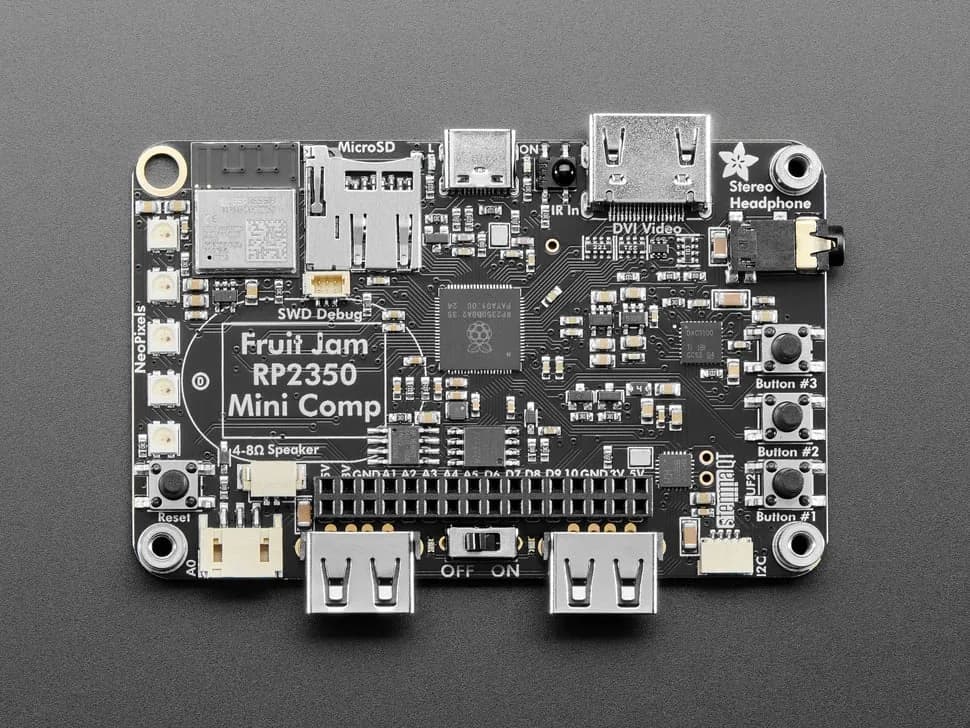
Fruit Jam
Credit-card-sized RP2350B computer board with DVI output, USB host, microSD, audio, Wi-Fi coprocessor and GPIO expansion.
- Platform
- Raspberry Pi RP2350B with ESP32-C6 connectivity coprocessor, CircuitPython/Arduino/Pico SDK · Circuitpython
- Builds
- 11