Quake II demo on Fruit Jam
Run the three-level Quake II demo on an Adafruit Fruit Jam with HDMI video, USB gamepad input and microSD saves, with explicit pre-release and overclocking limits.
View original project ↗What you’re building
pico-quake2 ports Quake II to the RP2350-based Fruit Jam using its 8 MB PSRAM and 16 MB flash. This is an early pre-release experiment, not a replacement for playing the game on a PC: the author reports that the three demo levels and saving work, but crashes remain possible. The documented roughly 20–25 fps, lower in busy scenes, uses a view occupying only 70% of the screen; it is the author's measurement, not a Flashable hardware test. The internal 320×240 picture is doubled for 640×480 HDMI output. The firmware runs the chip at 378 MHz and 1.50 V, outside its rated specification: stop here if you do not accept that overclocking risk. A stock Raspberry Pi Pico 2 or Pico 2 W is not a substitute; the port requires PSRAM and 16 MB flash. Start with the exact Fruit Jam UF2 and the demo rather than assuming arbitrary boards or the full game work. Only a DualShock 4 is documented as tested among USB inputs; keyboard, mouse and other gamepad support in code is not equivalent to tested compatibility. Audio uses HDMI or the Fruit Jam headphone jack, not its speaker. Multiplayer, mission packs, mods and CD music are unsupported. The engine's GPL source licence does not cover the demo's proprietary game data; keep its accompanying licence and do not treat it as freely reusable art or commercial content. Existing manufacturer board imagery illustrates the hardware, not a gameplay screenshot or proof of a bench test.
Key steps
- Read Status and limitations in the pinned source before downloading. This firmware overclocks the RP2350 to 378 MHz at 1.50 V; do not proceed if you need operation within the chip's rated specification. Back up the card and keep your previous firmware and its restore instructions.
- Open the original repository's Releases page. At this check, v0.2.1-alpha supplies pico-quake2_fruitjam.uf2 and pico-quake2_demo_sdcard.zip. Select the Fruit Jam file, not pico-quake2_adafruitdvisd.uf2. Compare release notes before using a newer binary.
- Hold BOOT while connecting the board to the computer. Copy pico-quake2_fruitjam.uf2 to the RP2350 USB drive. An error before the game data is installed is expected; do not repeatedly flash to fix a missing SD-card file.
- Extract the demo archive to the card root. Check that roms/quake2/baseq2/pak0.pak and roms/quake2/license.txt exist, with no extra enclosing archive folder. Keep the demo licence with the data; Flashable does not host or relicense it. The full game's levels are untested by the port author, so use the demo for this first checkpoint.
- Insert the card, attach HDMI and the USB gamepad, then power on. Expect a slow first load while level assets are copied into flash; the LED blinks during that copy. The cached assets persist across power cycles, but other firmware can overwrite them and make the next load slow again.
- Check that the attract demo appears, open Game and start a level. On a DualShock 4, Cross fires or selects, Circle jumps or goes back, and Start opens the menu. Leave the default 70% view size for the first test: enlarging the view reduces frame rate. Use HDMI audio or headphones rather than troubleshooting the unused board speaker.
- Use Start, Game, Save game and a slot, then test Game, Load game. Saves live in roms/quake2/baseq2/save/. If startup fails, distinguish No SD card from a missing roms/quake2 folder or pak0.pak; photograph the exact on-screen error before reporting it upstream. Record the release and controller used, and back up working saves before trying another application.
Original project and code
Hardware for this project
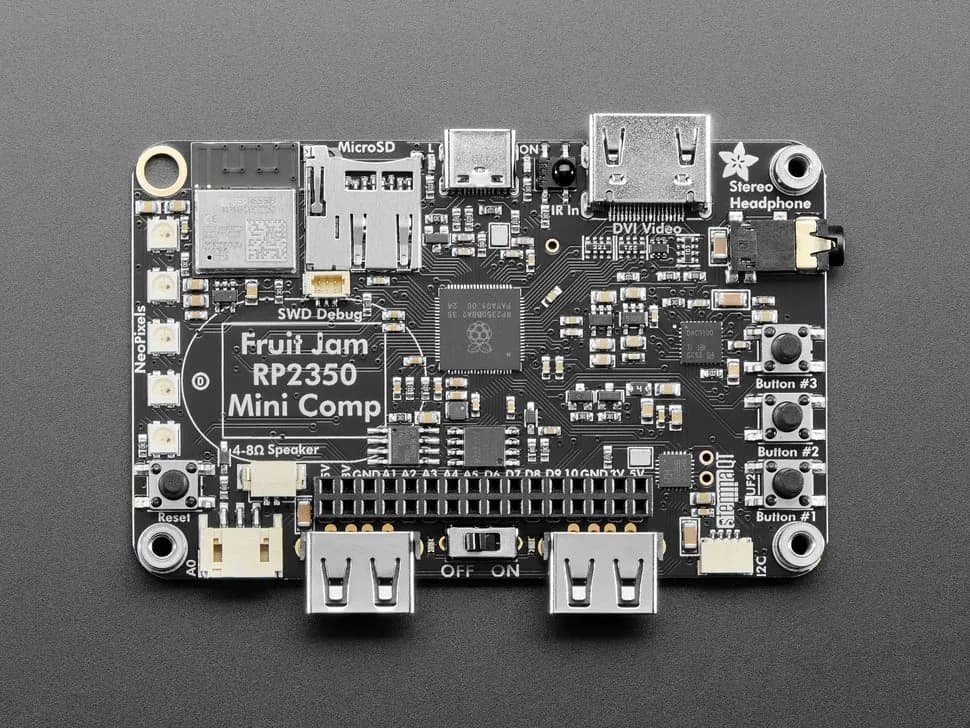
Fruit Jam
Credit-card-sized RP2350B computer board with DVI output, USB host, microSD, audio, Wi-Fi coprocessor and GPIO expansion.
- Platform
- Raspberry Pi RP2350B with ESP32-C6 connectivity coprocessor, CircuitPython/Arduino/Pico SDK · Circuitpython
- Builds
- 13