Pico Bootloader retro-console front end
Turn Fruit Jam into an SD-backed graphical launcher for a versioned bundle of RP2350 emulators and native game ports.
View original project ↗What you’re building
Pico Bootloader v0.6.3 is a resident front end for the Adafruit Fruit Jam and other supported RP2350 boards. Its Fruit Jam-specific HW_CONFIG 8 UF2 displays artwork-led Arcade, Computer, Console, Handheld and Ports categories, then flashes and starts the selected application from a microSD card. The current card bundle includes emulators for systems such as NES, SNES, PC Engine, Genesis, Master System, Game Gear, Game Boy, ColecoVision, TI-99/4A and Videopac, plus native OutRun, Doom and Duke Nukem 3D ports. An options menu can expose the SD card over USB and return the board to BOOTSEL mode. Version 0.6.3 updates only the card bundle: its loader remains the v0.6 build, while Master System/Game Gear v0.31 adds compatibility fixes and a Game Gear entry under Handheld. The project supplies no commercial game ROMs or required BIOS files. Use only files you are entitled to run, follow each application’s own compatibility and save-state limits, and back up the board and card before replacing firmware or the /emu folder.
Key steps
- For a fresh installation, back up any Fruit Jam firmware and microSD files you need, open release v0.6.3, and download both pico-bootLoader_AdafruitFruitJam_arm_piousb.uf2 and pico-bootLoader_sdcard.zip; do not substitute a UF2 for another RP2350 board. If loader v0.6 is already installed, skip the firmware steps and use the card-only update in the final step.
- Format the microSD card as FAT32 or exFAT, extract the release archive to its root so /emu and the sample configuration are present, then add only lawfully obtained ROM and BIOS files to the application-specific folders documented by the project.
- For a fresh installation, connect the Fruit Jam with a USB data cable, turn it on, hold BOOT/BUTTON1, press and release Reset, and continue holding BOOT until the RP2350 drive appears.
- Copy the Fruit Jam-specific bootloader UF2 to RP2350, wait for the automatic reboot, then power off before inserting the prepared microSD card and connecting the display, audio and controller.
- Power on, open one category, start a small known-compatible application, and verify video, audio, controls and return-to-loader behavior before adding a larger library.
- For a device already running loader v0.6, update to v0.6.3 by replacing only /emu from the new SD-card archive; keep ROMs, save states and other files outside /emu. If reusing the new boot.txt with an older loader, remove the VIEW, CATEGORY and APP lines first or the older loader reports BOOT.TXT INVALID.
Original project and code
Original project pages, manufacturer documentation and repositories used while preparing this page. Last reviewed .
Hardware for this project
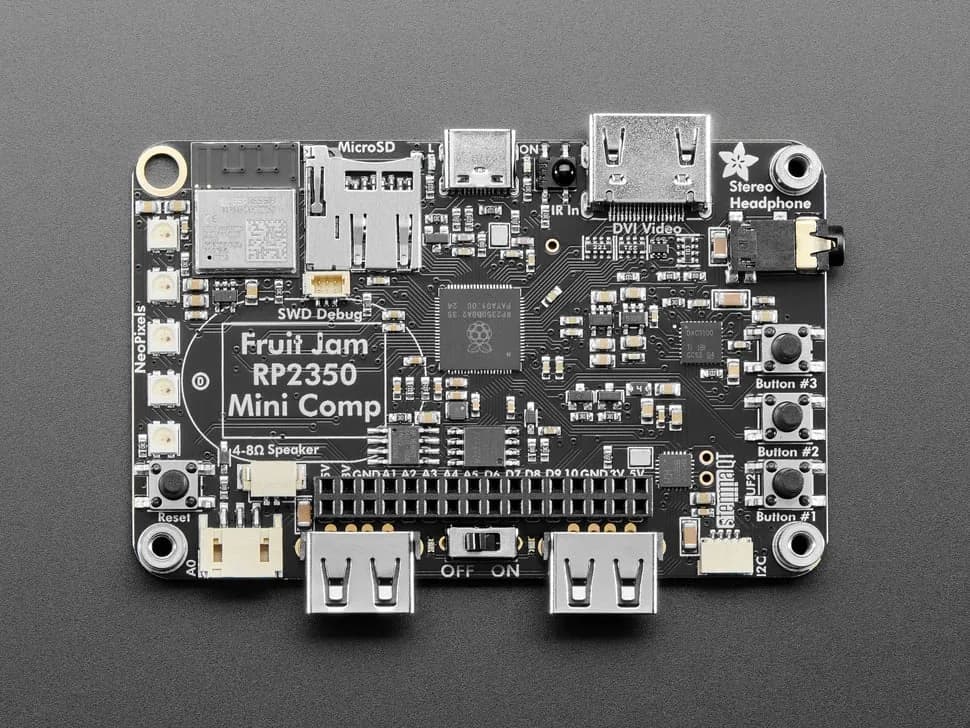
Fruit Jam
Credit-card-sized RP2350B computer board with DVI output, USB host, microSD, audio, Wi-Fi coprocessor and GPIO expansion.
- Platform
- Raspberry Pi RP2350B with ESP32-C6 connectivity coprocessor, CircuitPython/Arduino/Pico SDK · Circuitpython
- Builds
- 10