UNO R4 LED Matrix animations
Use Arduino's official library and examples to draw frames and animations on the board's built-in 12×8 LED matrix.
View original project ↗What you’re building
Arduino_LED_Matrix is the official core library for the 12-by-8 LED matrix built into UNO R4 WiFi. Its examples show several rendering paths: fixed frames, a mutable frame buffer, stored multi-frame animations, text through ArduinoGraphics, live preview, and Conway’s Game of Life. A sketch creates an ArduinoLEDMatrix object, starts the matrix, and either renders frame data directly or loads a generated sequence and plays it, optionally with automatic frame advance. The expected outcome is an animation, icon, text, or small visualization displayed without any external circuit; the MatrixIntro example pairs the shipped heart animation with the board’s built-in status LED. Compatibility is intentionally narrow: the library directory contains an UNO R4-only marker and the Flashable source points into ArduinoCore-renesas. The practical constraint is the tiny 96-pixel canvas, so artwork and frame sequences must be encoded in the library’s expected format and designed for severe resolution limits.
Key steps
- Install or update the Arduino Renesas Boards core and select Arduino UNO R4 WiFi in Arduino IDE.
- Open an official Arduino_LED_Matrix example such as DisplaySingleFrame, MatrixFrameBuffer, PlayAnimation, MatrixIntro, or a text example.
- For animation, keep the generated frame array in animation.h, include Arduino_LED_Matrix.h, create ArduinoLEDMatrix, and call loadSequence with that array.
- Call matrix.begin and matrix.play in setup; enable autoscroll with a millisecond interval only when the chosen sequence should advance automatically.
- Upload over USB and verify the 12-by-8 matrix output, then replace the sample frames or text while retaining the example’s data format and 96-pixel dimensions.
Original project and code
Hardware for this project
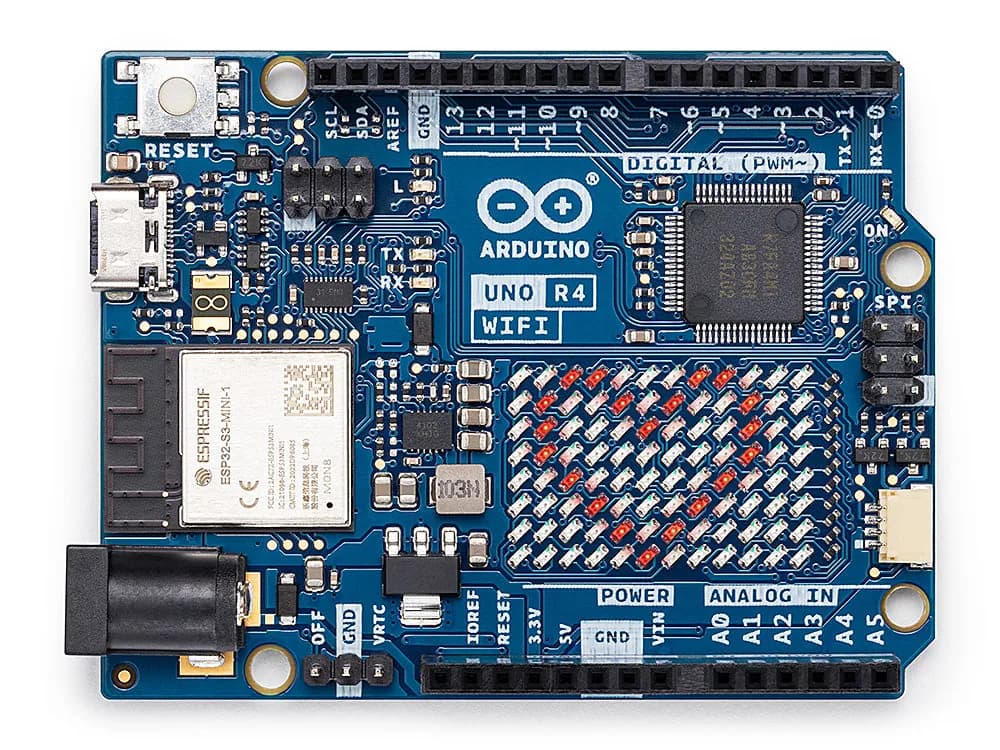
UNO R4 WiFi
UNO-form-factor board pairing a 32-bit Renesas MCU with ESP32-S3 connectivity, a 12×8 LED matrix and Qwiic connector.
- Platform
- Renesas RA4M1 plus ESP32-S3 connectivity module · Arduino
- Builds
- 02