CircuitPython Breakout game
Build a keyboard-controlled Breakout game with HSTX video and optional piezo sound on the Metro RP2350.
View original project ↗What you’re building
Anne Barela’s CircuitPython Breakout project turns the no-PSRAM Adafruit Metro RP2350 product 6003 into a small keyboard-controlled game system. The exact-board program draws 320×240 video through the RP2350 HSTX port, reads A and D plus Space from a USB host keyboard, tracks score and three lives, and can drive an optional piezo buzzer on D23. Metro users need a 22-pin HSTX cable and DVI adapter for the display. They must also fit a four-pin header for the USB host breakout: standard header requires soldering, while the guide permits correctly installed press-fit header and notes that soldering can improve the connection. Install the current stable Metro RP2350 CircuitPython build, then copy the guide bundle’s libraries and code.py to CIRCUITPY. Use the exact Metro project bundle because Fruit Jam uses a different board-specific version of the game.
Key steps
- Check that the board is Adafruit product 6003, back up files you need, and install the current stable Metro RP2350 CircuitPython UF2 until CIRCUITPY appears.
- With power disconnected, fit a four-pin header to the USB Host pads. Solder standard header, or install the guide’s press-fit option correctly; wear eye protection if cutting header.
- Connect the USB host breakout cable exactly as documented: GND to black, D+ to green, D− to white and 5V to red.
- Unlock the HSTX connector carefully, attach the 22-pin FPC cable silver-side down, connect the inverted DVI adapter at the other end, and do not force either latch.
- Download the guide project bundle, copy its required library files into CIRCUITPY/lib, and copy the Metro-specific code.py to the CIRCUITPY root.
- Connect the display and USB keyboard, optionally place the piezo buzzer between D23 and GND, then use A and D to move and Space to start or launch the ball.
Original project and code
Hardware for this project
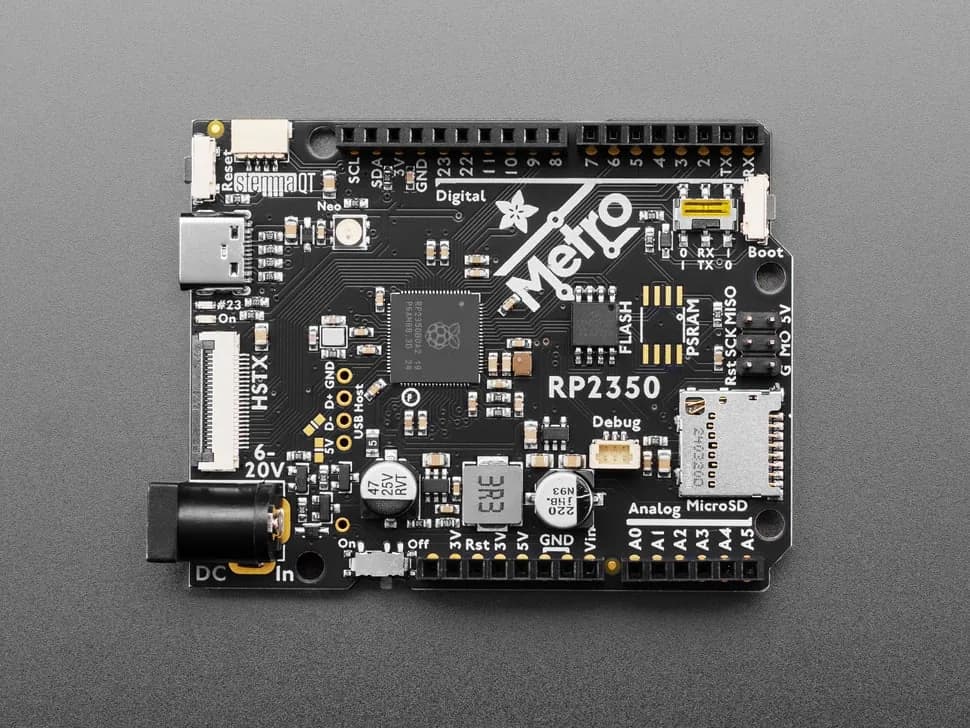
Adafruit Metro RP2350
Arduino-shaped RP2350 development board with 16 MB flash, microSD, HSTX video, USB host pads, STEMMA QT and broad GPIO expansion.
- Platform
- Raspberry Pi RP2350, CircuitPython/Arduino/Pico SDK · Circuitpython
- Builds
- 01